
Tangled cords and missing chargers can turn a straightforward trip into a source of stress. Even with modest tech gear, a little preparation centered around organizing electronics transforms travel experience dramatically and makes moving between airports noticeably easier.
Simple changes to your routine—like grouping cables or using clever storage pouches—help prevent annoying mishaps. Devices stay charged, headphones are always at hand, and you save valuable time not searching through cluttered bags.
This guide delivers realistic tips to organize electronics, protect your gadgets, and streamline your mobility. Dive in for detailed steps, practical gear suggestions, and habits travelers genuinely use for hassle-free journeys.
Establishing a Device and Charger Routine Before Departure
Your travel experience becomes smoother once organizing electronics is built into how you pack. Begin by creating a habit of reviewing and grouping your tech the night prior.
This upfront step ensures you never leave a cable behind, sidestepping last-minute panics about lost chargers or dead batteries during transit.
Grouping Tech Essentials with a Pre-Packing Process
Lay your gadgets and charging cords out on a desk. Pick them up, check each works, and put everything that travels together in one spot. This physical routine cements what you’ll truly use.
Following up, fold or coil all cords using simple cable ties. You avoid tangles and quickly recognize missing pieces. Many travelers mumble, “USB-C, Lightning, headphones,” as they count off their tools, one by one.
Completing this sort means your next step—selecting a storage pouch or kit—is easier. Space is used efficiently, clutter is controlled, and your entire tech pack is in visual order before going in your main bag.
Checking Redundancy to Lighten the Load
It’s easy to overpack chargers. Check if any devices share compatibility—such as a single USB-C charger for both your phone and e-reader. Store duplicates back home for lighter bags.
As you downsize, consider what you really relied on during your last trip. If a cable or device wasn’t pulled out, leave it behind. This targeted pruning makes organizing electronics a breeze and saves valuable space.
Match small items—SIM tools, SD adapters, tiny battery packs—to clearly labeled pockets or pouches before closure. Double-check each, repeating the ‘count and touch’ method so nothing gets left behind or brought unnecessarily.
| Tech Item | Action | Best Storage | Next Step |
|---|---|---|---|
| Phone charger | Check compatibility | Cable organizer pouch | Coil and secure with tie |
| Power bank | Fully charge | Small, padded pocket | Place next to phone pouch |
| Headphones | Test and wind cable | Hard shell case | Clip to bag exterior |
| USB-C cable | Check device match | Elastic loop in pouch | Label for instant ID |
| SD card | Back up contents | Secure case or zip pocket | Pack with camera/reader |
Choosing Storage That Keeps Electronics Accessible & Safe
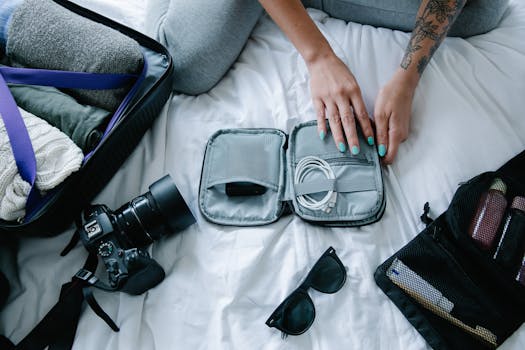
You’ll travel effortlessly by selecting pouches and cases that are built for organizing electronics. These containers keep delicate items padded and loosely grouped for quick removal.
Finding the right case matters because easy access means less risk of forgetting, dropping, or damaging your devices when in transit or at your seat.
Categorizing by Frequency of Use
Assign high-touch items—like your phone, earbuds, charging cord—to a slim, top-pocket pouch. Store low-frequency items, such as backup SIM cards or adapters, deeper in your luggage.
- Place your go-to charger and cord in the top pouch to minimize time spent searching at airports or in taxis.
- Store larger items, like a power bank, together in a nylon case to keep bulk contained on the move.
- Secure tiny tools—such as SIM card pins or SD adapters—in hidden zippered sections to prevent them slipping loose in your bag.
- Keep backup charging cables near, but not mixed with, your primary devices, so you can grab them quickly if your main option is lost or loaned.
- Group all camera or action cam accessories by coiling their cords and placing them with the main device—never loose—to cut down tech sprawl.
Organizing electronics in this fashion ensures each item is where you expect, right when you need it, which produces travel confidence, not clutter.
Protecting Cables and Plugs from Wear
Wrap flexible cords loosely to prevent permanent bends. Insert them in elastic mesh or cloth sleeves rather than the bottom of your bag to prevent accidental crushing.
- Choose a case with padded partitions so chargers don’t grind against plugins or screens.
- Avoid zip-top bags for long wires—a soft fabric pouch with cable ties reduces both tangle and wear, sparing you last-minute frustration.
- Use velcro cable wraps to individually secure power cords before placing them in any organizer, so setups and teardowns are smooth at every rest stop.
- Label both ends of your cables with masking tape to instantly know which cord goes with what device.
- Create a hard rule: nothing is loose—every piece in a defined pocket or elastic loop. This single act saves minutes per security check or gate change.
Protective storage isn’t about looks; it’s about consistency. Treat organizing electronics like packing for a miniature workshop, where each tool has a designated home.
Staying Charged Through the Chaos of Transit
Focusing on reliable, organized charging ensures your tech isn’t dead when you need it. Building in breaks to charge and using your organizer as a signal plan keeps your devices ready.
Portable power banks, compact cable rolls, and mindful sequencing are micro skills for modern travelers who view power as non-negotiable for work, navigation, and relaxation.
Sequencing Device Charging for Zero Downtime
When you top off essential devices during layovers or car rides, you create a safety net. Travelers say, “My phone never drops below 60% on travel days—no exceptions.”
Plug items in as soon as an opportunity presents itself, even if a full charge won’t be possible. Five minutes at an outlet can make a difference on long flights or between connections.
Pack a quick-access pouch with just the cable and power bank needed for your current device. As that item charges, use downtime to swap in your next device, practicing the sequence until it’s rote.
Distinguishing Essential vs. Backup Charging
Set a rule: carry only one backup item for each cable or charger. Mark the primary and backup with colored tape; pack them separately so you’re not left without both in case of lost luggage.
Scenario: A traveler keeps one wall plug and cable tucked in a jacket for hotspots, while the rest stay packed. Global travelers often stash their backup USB-C in a hidden bag seam, just in case plans change.
If a device hasn’t failed on recent trips, don’t add a fresh backup “just in case.” Let your experience guide what stays in your organizing electronics routine—you’ll travel lighter as a result.
Planning for Different Power Outlets and Airport Security Delays
Smooth travel depends on anticipating power differences and confidently presenting organized electronics at checkpoints. Preparation limits the surprises or delays that can throw off your timing and mood.
Organizing electronics for worldwide compatibility means keeping a reliable adapter kit ready and knowing local voltage details—just as professionals do on global work tours.
Managing International Adapters and Voltage
Assemble a travel-ready power adapter kit with the most common plug types for your destinations. Label each and attach a quick-reference card to read on the go, avoiding stressful guessing games at hotel outlets.
Add a compact voltage converter only if necessary. Check your essential devices in advance—many accept multiple voltages, reducing what you must pack. Experience teaches which nations require more robust gear and which hotels supply adapters on request.
Store all adapters in a single compartment, wrap cords tightly, and tape the quick guide to the inside cover. This micro routine minimizes confusion at the end of a flight when you just want to charge and rest.
Streamlining Airport Security with an Organized Tech Kit
Use a clear, zippered pouch or grid organizer for electronics. When agents can instantly see your chargers and gadgets, security checks proceed faster and with fewer repacks and awkward explanations.
Packing fewer, clearly labeled items demonstrates preparation. Officers appreciate immediate visibility and may send you through without extra inspection. Experienced travelers nod in agreement at the difference this organization makes.
Practice removing and replacing your entire electronics kit in under 30 seconds, as if rehearsing for a show-and-tell. This reduces on-the-spot stress and keeps you ahead of queuing crowds during busy travel periods.
Building a Personalized Electronics Packing Checklist
A written checklist customizes your organizing electronics method to your real needs—not what retailers or friends suggest. This approach reduces anxiety and doubles as a backup in case of last-minute distractions or emergency repacking.
Designing a Travel Tech Checklist that Sticks
Start your checklist with obvious items—phone, main charger, and one backup cable—then add per-trip specialties such as camera gear or presentation devices. Note the reason for each inclusion, which builds intention and limits bloat.
Refer to your checklist before you zip your bag. Run your finger down the list for tactile confirmation. Script: “I have my noise-canceling headphones, charging pod, and Kindle cable, all labeled and wound tight.”
Leave space on each checklist version to record what was unused. After the trip, cross off redundant items, making your next packing even leaner. This gradual refinement is a hallmark of seasoned travelers who excel at organizing electronics.
Frequently Asked Questions
What’s the fastest way to organize cables for travel?
Wind each cable individually, secure with a dedicated tie or velcro strap, and store in a zippered mesh pouch for visual checks. Label the ends for instant device matching and keep them separated from large gadgets.
How do I avoid forgetting small tech accessories at hotels?
Use a master packing checklist before you depart and every check-out morning. Assign tiny tools (like SD cards) their own mini case or pocket within your main organizer, and always count each item back in after use.
Should all chargers go in carry-on bags?
Pack essential chargers—phone, laptop, earbuds—in your carry-on so you have power access if luggage is delayed. Less critical, infrequently used chargers or adapters can travel in a checked bag if you must split weight.
What’s the best case type for organizing electronics in a backpack?
Choose a multi-pocket or grid-style pouch that fits your backpack’s front pocket. Go for one with both elastic loops (for cords, small chargers) and zip or mesh sections (for adapters, battery packs) for flexible control and safety.
How can I adapt my routine for frequent international trips?
Keep an international adapter kit assembled, with country labels and voltage notes inside. Review destination power requirements before flying. Upgrade your checklist after each trip based on real experience—drop unused gear and fine-tune your pouch setup.